Showing posts with label Tech. Show all posts

2 Billion Phones Cannot Use Google And Apple Contact-Tracing Tech

1 comment

As many as a billion mobile phone owners around the world will be unable to use the smartphone-based system proposed by Apple and Google to track whether they have come into contact with people infected with the coronavirus, industry researchers estimate.

The figure includes many poorer and older people—who are also among the most vulnerable to COVID-19—demonstrating a “digital divide” within a system that the two tech firms have designed to reach the largest possible number of people while also protecting individuals’ privacy.

Apple’s iPhones and devices running on Google’s Android operating system now account for the vast majority of the 3.5 billion smartphones estimated to be in active use globally today. That provides a huge potential network to track infection, with surveys suggesting widespread public support for the idea.

The two rivals are collaborating to develop a contact-tracing system for release as soon as next month.

However, their scheme relies on specific wireless chips and software that are missing from hundreds of millions of smartphones that are still in active use, particularly those that were released more than five years ago.
“The underlying technology limitation is around the fact that there are still some phones in use that won’t have the necessary Bluetooth or latest operating system,” said Ben Wood, analyst at CCS Insight. “If you are in a disadvantaged group and have an old device or a [basic] feature phone, you will miss out on the benefits that this app could potentially offer.”

Public health agencies are being asked to incorporate the Silicon Valley companies’ technology into their own apps, which will notify people if they have come into contact with an infected individual and urge them to self-isolate. The more people who opt in to using the app, the more successful the system will be.

The particular kind of Bluetooth “low energy” chips that are used to detect proximity between devices without running down the phone’s battery are absent from a quarter of smartphones in active use globally today, according to analysts at Counterpoint Research. A further 1.5 billion people still use basic or “feature” phones that do not run iOS or Android at all.

“In all, close to 2 billion [mobile users] will not be benefiting from this initiative globally,” said Neil Shah, analyst at Counterpoint. “And most of these users with the incompatible devices hail from the lower-income segment or from the senior segment which actually are more vulnerable to the virus.”

Smartphone penetration and uptake of particular devices varies widely around the world. In the UK, media regulator Ofcom said last year that about 80 percent of adults own a smartphone. However, Mr. Wood estimates that only around two-thirds of adults would have a compatible phone.

“And that’s the UK, which is an extremely advanced smartphone market,” he said. “In India, you could have 60-70 percent of the population that is ruled out immediately.”

Counterpoint Research is more optimistic, estimating that 88 percent compatibility in developed markets such as the US, UK, and Japan, while about half of people in India would own the necessary handset.

“Apple and Google working together to enable the use of Bluetooth technology to help government agencies identify and arrest the spread of the virus is a step in the right direction,
Read More

Samsung No Longer Syncs Keyboard Data Between Cell Phones

Leave a Comment

If you’re about to hop from your current Samsung phone to a Galaxy S20, don’t expect your keyboard info to come along for the ride. Samsung has stopped syncing keyboard data through its Cloud service as of April 13th, according to a notice seen by SamMobile. Your word predictions, saved words and language details (among other things) won’t carry over when you switch devices. It’s an unusual move when the company syncs virtually everything else, such as the browser and notes.

The notice reaching customers was dated March 15th, but it appears to have only reached customers in recent days.

This won’t be a huge issue if you’re willing to switch to alternatives like Gboard or SwiftKey, some of which have unique features on top of syncing. Still, it’s something of a hassle if you’ve amassed years of custom words on Samsung devices — you may be forced to start from scratch.
Read More

How to Change IP Address in Windows (without any VPN)

Leave a Comment

how to change ip address without vpn

Internet Protocol Address (IP address) is a arithmetical label given uniquely to each device connected to a computer network that uses the Internet for communication. An IP address assists two principal functions: host or network interface identification and location addressing. IP addresses are usually written and displayed in understandable codes, such as 172.16.254.1
The IP address space is managed globally by the Internet Assigned Numbers Authority (IANA), and by five regional Internet registries (RIRs) responsible in their selected areas for assignment to end users and local Internet registries, such as Internet service providers. IP addresses have been scattered by IANA to the RIRs in blocks of approximately 16.8 million addresses each. Each ISP or private network administrator assigns an IP address to each device connected to its network.

Why changing an IP address?

Most of the internet users change their IP addresses to bypass country or state location restrictions or in simple words to access the website that is blocked in their state or country but it’s not the only reason as there are several other reasons too.
However, there are numerous ways to change an IP address without any VPN, some of the ways do not work for every brand and model and for that you have to make custom changes from the router.
In this article below I’m going to guide you step by step upon changing the IP address without using any VPN extension. Let’s begin!

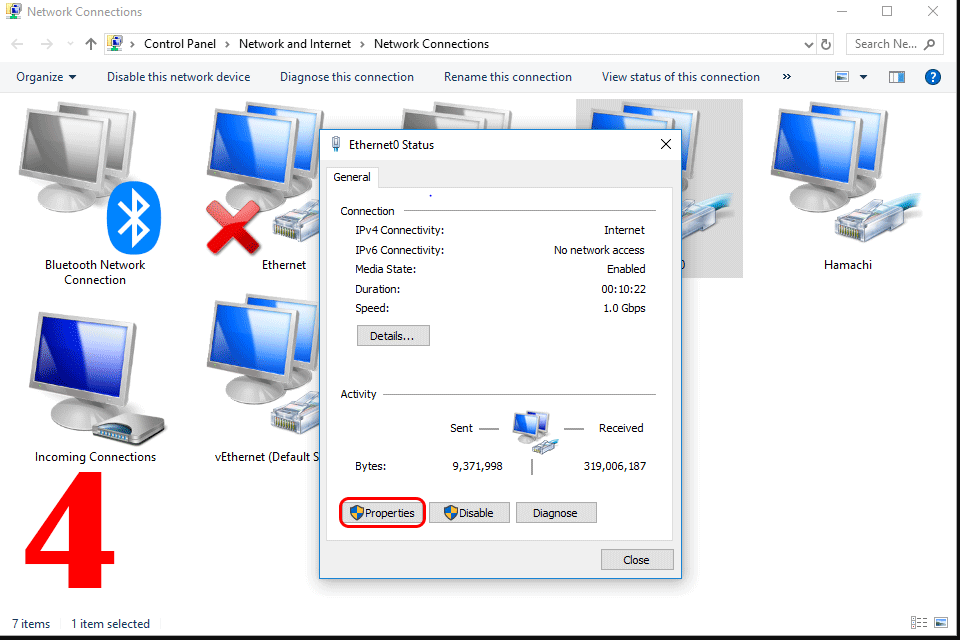
Step 1:  Go to the windows Control Panel and click on Network and Sharing Center.

Step 2: After that click on the “Change Adaptor Settings” which can probably be seen on the left side of the screen.

Step 3: Double left click the connection in question and open its Properties.


Step 4: Again, double left click the IPv4 item on the screen.


Step 5: Now select “Obtain IP Address Automatically”, the router will control the IP address automatically.


Video Tutorial:


Well that’s all about how to change IP address without using any VPN. If you find this article helpful please subscribe our blog to never miss a post. 

Don’t forget to tell us your reviews in the comments below!

Read More

How to Make a Drop Down List in MS Excel Spreadsheet

Leave a Comment

Microsoft Excel spreadsheet

Microsoft Excel Spreadsheet is developed by Microsoft for Windows, MacOS, Android and iOS. It features calculation, graphing tools, pivot tables, and a macro programming language called Visual Basic for Applications. It has been a very widely applied spreadsheet for these platforms, especially since version 5 in 1993, and it has replaced Lotus 1-2-3 as the industry standard for spreadsheets. Excel forms part of Microsoft Office.

Drop down lists are actual beneficial especially if you want the users to select an option from the list instead of typing custom values. In MS Excel you can make the drop-down lists of your desired type for the users in an Excel sheet and the process isn't problematic, once you know the way then it’s very easy to implement.

In the steps below, I’ll be showing you that how can you create a drop-down list in MS Excel spreadsheet.

Create Drop-down List:
To crate a drop-down list in MS Excel spreadsheet, follow the steps below,

Step 1: On the second spreadsheet, type the desired items/value of your choice that you want to be appeared in drop-down list.

Micro soft excel drop down list

Step 2: Whereas, on the first sheet select the cell “B1”.

Microsoft excel drop down list


Step 3: On the top “Data Tab”, in the “Data Tools Group” you should click the “Data Validation”.

Microsoft Excel drop down list


Step 4: When the Data Validation dialogue box appears, in the allow box click List.

Step 5: Now click the Source box and select the range “A1:A3” on sheet 2 then click OK (If you want to hide sheet 2 from the users simply click sheet 2 and then select hide).

Microsoft Excel drop down list

Here's your drop-down list,

Microsoft Excel Drop down list


Read More

How to Crack WINRAR Password Protected Archive/File Easily Without Using Software

Leave a Comment

how to crack WINRAR password
WinRAR is a trial-ware file archiver utility for Windows, developed by Eugene Roshal of win.rar GmbH. It can create and view archives in RAR or ZIP file formats and unpack numerous archive file formats. To enable the user to test the integrity of archives. WinRAR supports creating encrypted, multi-part and self-extracting archives.
WinRAR is a Windows-only program. There's also an Android application called "RAR for Android” and command-line utilities called "RAR" and "UNRAR" (widely released since autumn of 1993), available for macOSLinuxFreeBSD, Windows and MS-DOS.
However, what to do if you ended up forgetting the password of your WinRAR protected file? Or incase you are making a typo. Whatever the reason will be but in this situation all you need is a genuine way to crack WinRAR password easily.
To crack the WinRAR password protected file you need to recover the file password in order to crack it. In the steps below, I’ll be sharing a quite easy method to the solution of your problem ahead.

Crack WinRAR File Password with CMD/Notepad.
In this method, I'm gonna guide you step by step to crack winRAR file password without using any additional software. Few of the times RAR files (password protected) eventually face problems. Most of the time we use several software to recover or crack the password but without using any additional software, we can easily do this by using easy and yet simple Notepad/CMD techniques.
If you fail to recall the password, you could similarly make your recovery tool (many of us prefer using numerical passwords), that's the excellency of batch script. You can create any tool of your own preference and choice. So, let's begin with the steps to create our password recovery tool with Notepad/CMD. Following are the steps you need to follow to crack WinRAR password with Notepad/CMD.
Please note that this method will only recover the numerical passwords of WinRAR Archives!
Let’s begin with the steps…
Step 1: Open notepad by clicking on Start > click on Programs > click on Accessories and then click on Notepad.
OR
By using shortcut key press Windows Key (or Ctrl-Esc) and N.
Step 2: Copy the code (below) and paste it in the notepad.

REM nowhowtodo.blogspot.com
@echo off
title RAR Password Cracker
mode con: cols=47 lines=20
copy "C:\Program Files\WinRAR\Unrar.exe"
SET PSWD=0
SET DEST=%TEMP%\%RANDOM%
MD %DEST%
: RAR
cls
Echo----------------------------------------------
echo                   GET DETAIL
Echo----------------------------------------------
Echo.
SET/P "NAME=Enter File Name  : "
IF "%NAME%"=="" goto NERROR
goto GPATH
:NERROR
Echo----------------------------------------------
echo                      ERROR
Echo----------------------------------------------
Echo Sorry you can't leave it blank.
pause
goto RAR
: GPATH
SET/P "PATH=Enter Full Path : "
IF "%PATH%"=="" goto PERROR
goto NEXT
: PERROR
Echo----------------------------------------------
echo                      ERROR
Echo----------------------------------------------
Echo Sorry you can't leave it blank.
pause
goto RAR
: NEXT
IF EXIST "%PATH%\%NAME%" GOTO START
goto PATH
: PATH
cls
Echo----------------------------------------------
echo                     ERROR
Echo----------------------------------------------
Echo Opppss File does not Exist.
pause
goto RAR
: START
SET /A PSWD=%PSWD%+1
UNRAR E -INUL -P%PSWD% "%PATH%\%NAME%" "%DEST%."
IF /I %ERRORLEVEL% EQU 0 GOTO FINISH
GOTO START
: FINISH
RD %DEST% /Q /S
Del "Unrar.exe"
cls
Echo----------------------------------------------
echo                     CRACKED
Echo----------------------------------------------
Echo.
Echo PASSWORD FOUND!
echo FILE  = %NAME%
echo CRACKED PASSWORD = %PSWD%
pause>NUL
exit
REM

Step 3: Click on "Save As" to save the file with “crack.bat” and it is necessary to save the file with .bat extension.

how to crack WINRAR password


Step 4: Now open the desired file that you recently saved with “crack.bat”. The CMD screen will be displayed on your screen.

Step 5: Copy and paste the name of file along with extension (.bat) and press Enter. Now input the location of desired file, for that view the properties of RAR file to know the location of file.

Step 6: After a short period of processing it will take a couple of minutes to find the password till then you have to wait and watch …

Well that’s all about cracking WinRAR password protected file/archive. If you found this article helpful to crack WinRAR password protected file please Subscribe to our Blog to never miss a post.

Don’t forget to tell us your reviews in the comments below.

Read More